revised 19 April 2019 by Zhen Zhen McMahon and Henry M. Walker


| CS 199 | Willamette University | Spring, 2019 |
|
Programming in PHP, Databases with MySQL, and Web Applications |
||
Try-catch statements are used to instruct the program on how to proceed in the case of a specific condition being met that is outside of the primary expected result.
The initial attempted action is specified in the try part of the statement. In the event the conditions are such that it cannot be fulfilled, an exception is thrown.
An exception is when something outside of normal processing occurs. This means that instead of executing the next linear line of code the program will refer to the catch block for the subsequent commands.
Try-catch syntax follows the pseudo-code found in your textbook on page 123:
  try {
      code that will execute should no error occur
  }
  catch (ExceptionType $e) {
      new command given an exception is thrown
  }
Terminology
Try: Initial code that is run. If no errors occur, it runs normally
Throw: If an exception is triggered in the try block, it is 'thrown'
Catch: When the exception is triggered in the 'try' block, it is thrown and the 'catch' provides the exception information that provides new instructions. Every try must have a minimum of one catch block.
Although try/catch blocks can be used to handle errors, it is not constrained to this purpose. If one anticipates several likely outcomes and wants the program to do something different in each case, a try/catch statement can be used. It should be noted that good practice dictates that catching exceptions should be implemented when one has a specific manner in which they intend to handle them.
Example
try {
  $error = 'Always throw this error';
  throw new Exception($error);

  // Code following an exception is not executed.
 echo 'Never executed';
}catch (Exception $e) {
  echo 'Caught exception: ' .  $e->getMessage() . "\n";
}

// Continue execution
echo 'Hello World';
Example from Tutorials Point
//create function with an exception
function checkNum($someNum) {
    if($someNum > 3) {
      throw new Exception("Too slow to win");
    }
    return;
}

//trigger exception in a "try" block
try {
  checkNum(2);
  //If the exception is thrown, this text will not be shown
  echo 'If you see this, you won a medal';
}

//catch exception
catch(Exception $e) {
  echo 'Message: ' . $e->getMessage();
}
The above code uses a try/catch to retrieve data from the function checkNum. This problem applies in the event of a competition or race where the top three placements receive a medal. $someNum is the placement that person finished. If $someNum is 3, 2, or 1 then that person did well enough to receive a medal.
Describe what parts of the above code will run and be printed given the values assigned below:
If you didn't use a try/catch statement for this problem, what other methods would fulfill this function?
The word 'throw' is used in the if statement above. Based on the context, describe what you believe to be the keyword's function. Then look it up to see if you're correct.
There are two common strategies for handling errors:
Traditional approach: When the function returns an error the calling environment explicitly tests the return values for evidence of an error and then takes needed action. The standard syntax is:
$result = f(.....);
    if ($result == error){
      handle condition
    }
    else{
      proceed with normal processing
}
This works fine and allows for sophisticated error handling. However, much of the main code may be devoted to error handling at every function call.
Exceptions: An exception is thrown if something unusual happens. The exception interrupts the normal flow of processing, and error handling is separated into a contained catch block.
try {
  $result = f(.....)
  proceed with normal processing
}
catch{
  handle condition
}
For simple error handling the two approaches function very similarly. However, the use of exceptions can aid clarify and logical organization of material when several different error exceptions can arise or when functions are nested (e.g., f(g(...)).
This problem explores the use of functions to retrieve an array value via its index.
Create an array '$arr' containing 10 arbitrary values.
Write a function that uses a try/catch statement to retrieve and return the array element with the given index.
The function should accept two parameters: the array and the index value.
$arr[$i] should be returned if the value exists, or else throw an exception.
The function should contain a catch statement to handle an exception (e.g. the user provided an index value larger than the size of the array.) by printing the string: "Sorry, this element could not be found"
In the main, call the function with the array a few times with the index present and without to make sure it's working.
In part a, the try/catch was embedded in the function. Now, move the try/catch statement outside the function in the greater calling environment.
            try{
              $result = yourFunction();

            }
            catch(Exception $e){
            }
Describe what happens given the following indexes:
Remove the try/catch statement from step d and simply leave a for loop to find the value. Describe the results. Is an error signaled within the PHP syntax?
PHP has a built-in class or feature called 'Exception' that can contain three optional parameters: an error message, an error code, and/or a previous exception. It has multiple built in methods that allow programmers to see where the error occurred. We will use the following:
getLine(): source line.
This returns the line number where the exception was created. The syntax is as follows:
try {
    throw new Exception("The error");
} catch(Exception $e) {
    echo "The exception was occured on line: " . $e->getLine();
}
Add the getLine() function to the catch portion of your code and use an index value larger than 10 to test it.
catch{Exception $e){
    echo 'Sorry this element could not be found. Error located in line: ' . $e->getLine();
}
Examine the code below for finding the index of an array element:
        function findIndex($value){
	  $thisArray = array('primary', 'secondary', 'success', 'danger', 'warning', 'info');
          for($i=0; $i < sizeof($thisArray); $i++){
	           if($thisArray[$i] == $value)
		           echo $i;
               return;
             }
	         throw new Exception("No value found");
        }

	try{
          findIndex();
          return;
        }
	catch(Exception $e){
          echo "Sorry, I can't find this value";
        }
Describe what is happening in the above code
Next describe what will occur given the $value variable is the following:
$value = "info";
$value = "test";
The two implementations of try/catch practiced in problem 2 have the try/catch block in the calling field to run a function or throwing an exception; and using the try/catch within the function itself. The example above used the former. Write some code that performs the same function in the latter method with the try/catch block inside the function.
We can use the PHP function sqrt() with a non-negative integers to retrieve their square root values. This does not work for negative integers. Write a try/catch block checks to ensure the square root can be derived.
If the value is a positive integer, call the PHP sqrt() function and return the value.
In the event that the integer is negative, the catch statement should print: "Square root cannot be derived" and break.
If the square root can be found, multiply the returned value by 10 and print the result.
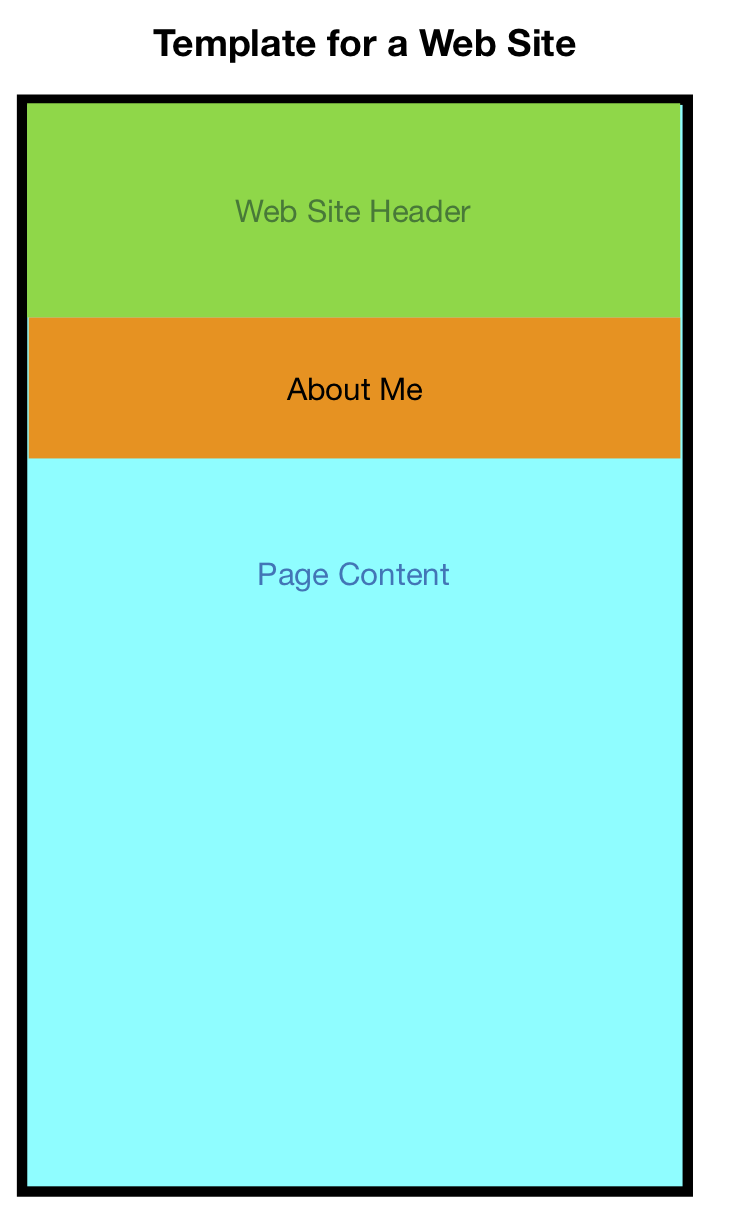
Every page for this course contains a header that says: "Programming in PHP, Databases with MySQL, and Web Applications". More generally, let's create a header template that shows up on multiple pages for a webpage of our own. In addition, on some Web sites, an "about me" of one or two sentences may appear. A diagram for this general approach is shown at the right.
<a href="mailto:someone@example.com">Email
          Me</a>
Use the 'require' statement for error handling to link the header file to both the index and the about pages.
Record your results when you misspell the header file name in the require statement.
In connecting with a database, suppose someone incorrectly enters the name of the database, a username, or password. Try/catch statements can be used to handle this situation.
For this section of the lab, be sure to review chapter 3 (p. 79-112) of your textbook.
The following code is from Professor Walker's documentation from March 11-13. After practicing implementing try/catch statements we can understand what specifically is happening in this code. Examine the below method of connecting to a database:
/* procedure to establish a connection to a MySQL database
 in this version, the program exits if no connection is established
*/

function database_connect ($database, $username, $password)
{
  try {
      $pdo = new PDO("mysql:host=localhost;dbname=$database", $username, $password);
      // set the PDO error mode to throw exception when run-time error encountered
      $pdo->setAttribute(PDO::ATTR_ERRMODE, PDO::ERRMODE_EXCEPTION);
      // provide as much protection as possible to counteract possible injection attacks
      $pdo->setAttribute(PDO::ATTR_EMULATE_PREPARES, false);
  }
  catch (Exception $e) {
      echo "error connecting to $database \n";
      echo "full error message " . $e->getMessage() . "\n";
      echo "exiting\n";
      exit;
  }
  return $pdo;
}
Note how the try/catch block is used in the initial function. $pdo accepts the three parameters: location, $username, and $password.
In the event the try block cannot be executed, the catch prints out "error connecting to $database..." etc.
Connection test
/* a simple program, illustrating how to open, access, and print data
 from a database table, using pdo

 in this version, error handling for the connect is handled
 in the databaase_connect function

/* initializing database variables */
require "credentials.php";       // for $username and $password
require "mysql-connect-1.php";   // for database_connect function
$database = 'hwalker';

/* establishing a connection to the database */
$pdo = database_connect ($database, $username, $password);

echo "connected to database $database\n";

/* query the database */
$table = "faculty";
try {
  $sqlQuery = "SELECT * FROM $table";
  echo "query:  $sqlQuery \n";
  $result = $pdo->query($sqlQuery);
}
catch (Exception $e) {
  echo "exception executing query:  $sqlQuery \n";
  echo "MySQL/PHP message:  $e->getMessage \n";
  echo "      likely table empy\n";
}

/* report results */
if (isset ($result))
 {
    echo "$table table:\n";
    while ($row = $result->fetch()) {
       echo "     " .$row['first'] . " " . $row['last'] . "\n";
    }
 }
else
 {
    echo "$table table empty\n";
 }

/* closing the database connection */
$pdo = null;
echo "database connection closed\n";
Once the database is connected, this section of the code extracts the data from $table.
Review the above code carefully.
Describe the circumstance that would cause an exception to be triggered. Describe the output that would be printed.
Summarize the conditions that need to be in place for the path of the code to print the "$table table empty\n"; line.
If the try block cannot be executed in the database_connect function the program will continue with the sqlQuery attempt. Describe how you think this may affect processing.
There is not one "correct" way to query the database. Look at another method of doing this below:
/* procedure to establish a connection to a MySQL database
 in this version, the program exits if no connection is established
*/

function database_connect ($database, $username, $password)
{
      $pdo = new PDO("mysql:host=localhost;dbname=$database", $username, $password);
      // set the PDO error mode to throw exception when run-time error encountered
      $pdo->setAttribute(PDO::ATTR_ERRMODE, PDO::ERRMODE_EXCEPTION);
      // provide as much protection as possible to counteract possible injection attacks
      $pdo->setAttribute(PDO::ATTR_EMULATE_PREPARES, false);

  return $pdo;
}
Note that this version does not implement error handing (the try/catch statement) in the database_connect() function.
Examine the following main and read the comments to understand how it works:
Connection test
/* a simple program, illustrating how to open, access, and print data
 from a database table, using pdo

 in this version, error handling for the connect is handled
 in the main program

/* establishing a connection to the database */
require "credentials.php";       // for $username and $password
require "mysql-connect-2.php";   // for database_connect function
$database = 'hwalker';

try {
  $pdo = database_connect ($database, $username, $password);
}
catch (Exception $e) {
  echo "error connecting to $database \n";
  echo "full error message " . $e->getMessage() . "\n";
  echo "exiting\n";
  exit;
}

echo "connected to database $database\n";

/* query the database */
$table = "faculty";
try {
  $sqlQuery = "SELECT * FROM $table";
  echo "query:  $sqlQuery \n";
  $result = $pdo->query($sqlQuery);
}
catch (Exception $e) {
  echo "exception executing query:  $sqlQuery \n";
  echo "MySQL/PHP message:  $e->getMessage \n";
  echo "      likely table empy\n";
}

/* report results */
if (isset ($result))
 {
    echo "$table table:\n";
    while ($row = $result->fetch()) {
       echo "     " .$row['first'] . " " . $row['last'] . "\n";
    }
 }
else
 {
    echo "$table table empty\n";
 }

/* closing the database connection */
$pdo = null;
echo "database connection closed\n";
As one can see, the code can be written in different ways to accomplish the same task.
What advantages or disadvantages do you see in putting the try/catch block for establishing the connection to the database in the main code versus the database_connect function?
While you think about this, keep in mind the kind of information that could be included in the catch block to alert the user or the programmer what has gone wrong.
The connection test contains two sets of try/catch statements: one to connect to the database and the other to query the database. What would be the benefit to combining these into one try/catch statement that performs both actions? Explain your reasoning.
|
created 14 April 2019 by Zhen Zhen McMahon revised 19 April 2019 by Zhen Zhen McMahon and Henry M. Walker |
|