| CSC 207 | Grinnell College | Fall, 2018 |
| Algorithms and Object-Oriented Design | ||
This laboratory ties together several components of programming in Java:
Before working on this lab, be sure you have
Summary: From many perspectives, Eclipse and GitHub do not work and play well with each other.
Professor Rebelsky has noted,
"Warning! Eclipse behaves strangely if you put the Git
repository inside the Eclipse directory. I'd suggest setting up two
directories for this class, one for things created in Eclipse, and one
for things under Git."
My experience is entirely consistent with this observation.
Online, you can find a variety of sources that outline the numerous steps (perhaps 1 – dozen steps) required to allow Eclipse to function properly with GitHub.
Some sources also suggest that the specifics of the configuration may change over time, as new versions of software appear.
Altogether, this coupling of Eclipse and GitHub seems problematic. Thus, as Professor Rebelsky suggests, you are encouraged to place your work for a CSC 207 lab, project, or supplemental problem into two directories.
Within your overall GitHub directory (e.g., ~CSC207/Git, create a subdirectory (e.g., javadocs-input) for programs related to this lab. The GitHub Classroom link for this lab is https://classroom.github.com/g/Cv0WyWct Use that link to create a team for this lab, set up a repository for this assignment, and connect that assignment with this subdirectory. With this done, a copy of each file (e.g., —.java will be placed in this subdirectory, and you will pull, add, commit, and push the files between this local repository and GitHub.
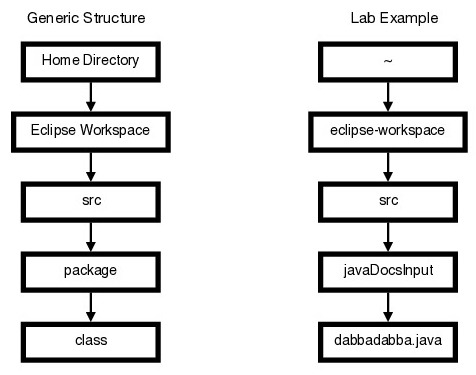
Within Eclipse, create a package (e.g., javaDocsInput) for this lab. Although the package could be placed within a variety of structures, a natural choice would be to use the default directory (e.g., eclipse-workspace) and the default project (e.g., Examples). Within this package, create new classes as needed. You can edit and run these programs within Eclipse, just as you have done previously in this course.
Eclipse organizes your projects, packages, and classes in a hierarchical directory structure. In particular, source code for a class is placed in the following directory structure:
With files in these two structures, you could use the cp command to copy relevant files from one subdirectory to the other.
Create a new Class dabbadabba within your directory for this lab and paste the code dabbadabba into Eclipse. As you will see, this code is a syntactically correct-yet-poorly formatted Java program. It certainly does not conform to the CSC 207 Java Style Guide!
File Grinnell-rainfall.dat contains daily rainfall totals for each day over several years. For example, the start of the current file begins:
Year  Day     Jan     Feb     Mar     Apr     May     Jun     Jul     Aug     Sep     Oct     Nov     Dec
2016    1    0.00    0.00    0.06    0.00    0.09    0.00    0.00    0.00    0.01    0.00    0.00    0.00
2016    2    0.11    0.00    0.00    0.15    0.00    0.00    0.00    0.00    0.00    0.00    0.00    0.00
2016    3    0.01    0.00    0.00    0.84    0.00    0.00    0.00    0.53    0.00    0.23    0.01    0.00
2016    4    0.00    0.00    0.00    0.01    0.00    0.00    0.00    0.00    0.00    0.12    0.01    0.10
2016    5    0.00    0.00    0.00    0.59    0.00    0.00    0.00    0.00    0.00    0.00    0.00    0.00
2016    6    0.00    0.00    0.42    0.00    0.00    0.00    0.00    0.00    0.00    1.02    0.00    0.00
2016    7    0.00    0.00    0.00    0.00    0.00    0.00    0.00    0.00    0.00    0.23    0.00    0.00
2016    8    0.00    0.00    0.00    0.00    0.00    0.00    0.00    0.00    0.00    0.00    0.00    0.00
2016    9    0.00    0.00    0.00    0.00    0.00    0.00    0.00    0.00    0.00    0.00    0.00    0.00
2016   10    0.46    0.00    0.00    0.05    1.52    0.00    0.04    0.00    0.00    0.85    0.00    0.00
2016   11    0.00    0.00    0.00    0.00    0.00    0.00    0.89    0.00    0.00    0.01    0.05    0.00
2016   12    0.00    0.00    0.00    0.00    0.00    0.00    0.52    0.00    0.00    0.01    0.19    0.00
2016   13    0.00    0.00    0.00    0.02    0.00    0.00    0.00    0.00    0.00    0.00    0.01    0.05
2016   14    0.00    0.00    0.00    0.16    0.00    0.14    0.00    2.47    0.00    1.12    0.03    0.00
2016   15    0.00    0.00    0.00    0.56    0.00    0.00    0.00    0.05    0.00    0.00    0.01    0.00
2016   16    0.47    0.00    0.00    0.00    0.00    0.31    0.00    0.05    0.70    0.00    0.00    0.00
2016   17    0.00    0.00    0.00    0.00    0.41    1.42    0.00    0.00    0.60    0.00    0.02    0.00
2016   18    0.00    0.00    0.00    0.01    0.00    0.00    0.48    0.00    0.21    0.00    0.15    0.00
2016   19    0.32    0.00    0.00    0.00    0.96    0.23    0.00    0.01    0.01    0.00    0.00    0.00
2016   20    0.04    0.34    0.00    0.00    0.22    0.00    1.15    0.21    0.00    0.00    0.00    0.00
2016   21    0.11    0.00    0.00    0.00    0.01    0.48    0.06    1.27    0.00    0.98    0.00    0.00
2016   22    0.01    0.00    0.00    0.00    0.00    0.09    0.00    0.05    0.00    0.27    0.00    0.00
2016   23    0.00    0.08    0.00    0.00    0.08    0.01    0.00    0.00    0.00    0.01    0.00    0.00
2016   24    0.10    0.15    0.33    0.00    0.00    0.00    0.00    0.03    0.00    0.00    0.00    0.00
2016   25    0.08    0.00    0.49    0.00    0.01    0.00    0.00    0.08    0.00    0.00    0.00    0.00
2016   26    0.00    0.00    0.14    0.30    0.20    0.00    0.00    0.00    0.58    0.00    0.00    0.00
2016   27    0.00    0.00    0.01    0.00    0.17    0.00    0.00    0.07    0.00    0.00    0.00    0.00
2016   28    0.00    0.00    0.00    0.28    0.00    0.25    0.00    0.01    0.00    0.00    0.00    0.00
2016   29    0.00    ---     1.06    0.51    0.00    0.00    0.00    0.01    0.00    0.09    0.00    0.00
2016   30    0.00    ---     0.03    0.77    0.00    0.00    0.00    0.00    0.00    0.00    0.00    0.00
2016   31    0.00    ---     0.00    ---     0.00    ---     0.00    0.00    ---     0.00    ---     0.00
Y
In this file, data are given for some number of full years, largely copied from www.grinnellweather.com. As this printout indicates,
The particular file contains rainfall for 2016, 2017, and 2018, but the file might be updated at any time to include more or fewer years.
Write a Java program that reads this file, determines the total rainfall for a year, and finds the two dates on which the largest rainfall occurred. (If more than two dates have the same maximum rainfall amount, the program may print any two of these dates. If one date has the maximum rainfail, and several dates are tied for second highest, then the program should print the date with the highest rainfall and any of the dates with the second highest.
If file, Grinnell-rainfall.dat, does not exist, is empty, or contains only the 1-line header, main processing should throw an exception that is caught to print that no rainfall data are available.
Reading data from a file usually is quite slow relatively to main-memory storage, so the program should make only one pass through the file data—no need to read the data several times.
Since only a maximum and second highest value must be determined, the program need not retain rainfall values beyond the maximum, second highest, and most recently-read rainfall amount. For example, it would be quite inefficient and wasteful of space to read all of the data into a 2-dimensional array to store rainfall amounts—no arrays of 2 dimensions or higher are allowed.
Similarly, a 1-dimensional array might be used to store month names (e.g., January, February, etc.), but 1-dimensional arrays of size more than 12 are not needed or allowed for this program. Of course, placing all rainfall data data into one or more strings is similarly prohibited.
More generally, only a small amount of data storage may be used for this program no more than 15-20 variables, and the amount of storage should not depend upon the number of years stored in the data file.
The final program should be submitted to the same repository used for the dabbadabba.java program developed earlier in this lab.
The final submission should include, code, a file containing the program's output, and a statement explaining why the output is correct.
As a collaborative effort, both partners must pull, add, commit, and push versions of this program.
|
created 16 September 2018 last revised 17 September 2018 |


|
| For more information, please contact Henry M. Walker at walker@cs.grinnell.edu. |