| CSC 161 | Grinnell College | Spring, 2015 |
| Imperative Problem Solving and Data Structures | ||
Laboratory Exercise on Functions, Part 2:
Passing Values and Addresses as Parameters
Preparation before Class
- Reading from Text
- King: Section 9.3, pages 191-200
- K&R: 1.7, 4.1-4.3
- Examples
Work Started in Class
Finding the Perimeter and Area of a Rectangle
In the previous lab, you were asked to write two functions related to circles: one computed the circumference given the radius, and the second computed the area given the radius. Following the same approach, program perim-area-1.c computes the perimeter and area of a rectangle, given the lengths of the two sides.
-
Copy perim-area-1.c to your account. compile and run it, and review how the program works.
-
Following the approach of the previous lab, draw a schematic diagram of main memory after the function perimeter has been called; and draw a second schematic diagram of main memory after the function area has been called.
-
In C, the address operator (&) allows one to determine the location or address in main memory where a variable is located. Make the following insertions into perim-area-1.c:
Insert into perimeter just before the return statement:
  printf ("parameter side1:  location: %u, value: %lf\n", &side1, side1);
  printf ("parameter side2:  location: %u, value: %lf\n", &side2, side2);
  printf ("local lengthPlusWidth:  location: %u, lengthPlusWidth: %lf\n", &lengthPlusWidth, lengthPlusWidth);
Insert into area just before the return statement:
  printf ("parameter side1:  location: %u, value: %lf\n", &side1, side1);
  printf ("parameter side2:  location: %u, value: %lf\n", &side2, side2);
Insert into main just before the return statement:
  printf ("variable length:  location: %u, value: %lf\n", &length, length);
  printf ("variable width:   location: %u, value: %lf\n", &width, width);
  printf ("variable perim:   location: %u, value: %lf\n", &perim, perim);
  printf ("variable area:    location: %u, value: %lf\n", &ar, ar);
Note: In this code, format %u prints a decimal integer, but ignores any initial minus sign. (We will talk more about signed and unsigned integers later in the course, when we study the representation of different types of data within a computer.)
Recompile and rerun your program. To interpret the output, suppose that the first printf statement in the perimeter function produced the output:
parameter side1: location: 28580, value: 5.00000
This indicates that the parameter side1 corresponds to memory location 28580, and the value 5.0 is stored there. This part of the schematic diagram might look like:
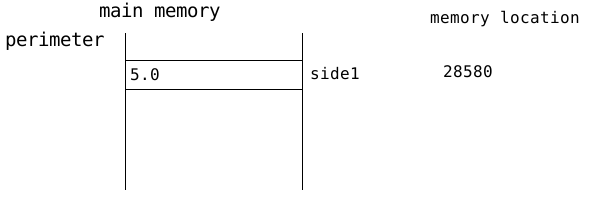
Use the address information from the inserted print statements to annotate the schematic diagrams from Step 1a with the actual locations or addresses where each parameter and variable was stored.
-
Program perim-area-1.c computed perimeter and area in two functions, because each function can only return one value. To obtain more than one result from a function, we have to change the nature of the parameters. This is illustrated in perim-area-2.c
Passing Values and Addresses as Parameters
Be sure you have completed the reading on passing values and addresses as parameters before continuing with this lab!
-
Copy perim-area-2.c, compile and run it, and check that it produces exactly the same output as perim-area.1.c
To understand how perim-area-2.c works, several print statements have been added to yield program perim-area-2a.c. Compile and run this program.
When the program was run on one machine, the program generated the following output:
working with a rectangle of width 7.000000 and length 5.000000
compute:  addresses, values, and pointer references
             side1:  address: 640370600, value: 5.000000
             side2:  address: 640370592, value: 7.000000
   lengthPlusWidth:  address: 640370616, value: 12.000000
   perimeter:        address: 640370584, value: 640370664, *perimiter: 24.000000
   area:             address: 640370576, value: 640370656, *area: 35.000000
the rectangle's perimeter is 24.000000
the rectangle's area is 35.000000
main:  variable addresses and values
   length:  address: 640370680, value: 5.000000
   width:   address: 640370672, value: 7.000000
   perim:   address: 640370664, value: 24.000000
   ar:      address: 640370656, value: 35.000000
This information gives rise to the following schematic for main memory that would have been encountered immediately before the compute procedure finished.
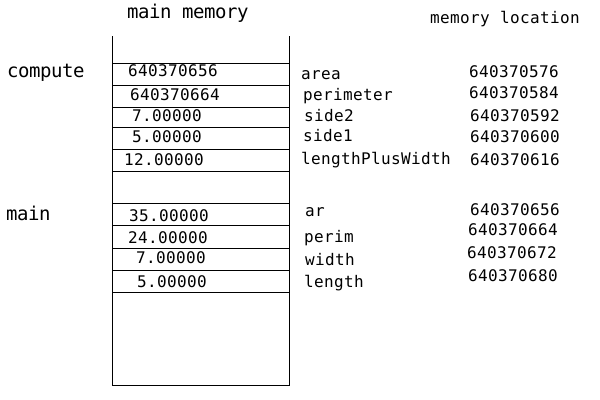
As we shall discover later in the course, each double requires 8 units (technically called bytes) of memory, so many of the locations given are 8 numbers apart.
-
Explain why the values stored in main memory for side1 and side2 duplicate the numbers stored in main memory for length and width, respectively.
-
The printf statement involving perimeter in compute indicates
- the address of perimeter (i.e., &perimeter) is 640370584; that is the variable perimeter is stored at location 640370584
- the value stored for perimeter is 640370664; note that this is the location of the perim variable in main
- the value referenced by the location stored in perimeter (i.e., the value stored in perim) is 24.00000.
Write similar statements about what is printed regarding the parameter area.
-
-
In the previous lab, you wrote two functions that computed the circumference and the area of a circle. Write a new version of your solution, so that the program has just one procedure circleCompute that has three parameters, the radius of a circle, the circumference, and the area. circleCompute has a void return type, but takes the radius as input and returns the circumference and area as changed parameters. (You will need to pass in the addresses of the circumference and area variables from your main procedure.)
-
Copy program amp-example.c to your account.
- Write a few sentences explaining what the program does.
- Draw a schematic diagram of main memory for just before valIncrease finishes.
- Draw another schematic diagram of main memory for just before refIncrease finishes.
-
Consider the program /home/walker/c/examples/lab2-1.c.
- Copy this program to your account.
- Compile and run this program. Explain each value printed.
- Draw a schematic memory diagram, showing variables and their values just before the pr procedure finishes.
- Edit out the address operation & in the call pr (x, &y), and make the corresponding changes in the pr procedure itself (e.g., remove the * as needed). Recompile and run. Again, explain why the resulting output occurs.
Homework
-
Consider the program /home/walker/c/examples/lab2-2.c.
- Copy this program to your account.
- Compile and run this program. Explain each value printed.
- Draw a schematic memory diagram, showing variables and their values just before the pr procedure finishes.
- Add the declaration int w = 100; as the first statement in the main procedure (before the declaration int x = 3;). Recompile and rerun your program. Does the output change? Explain. Does the result depend upon the value assigned to w? Why or why not?
- Add the declaration int z = 25; immediately after the declaration of y in main. Recompile and rerun. Again, does the output change? Why or why not?
- Within the printf statements for pr, change each a to *a and each b to *b. Recompile, rerun your program, and explain the resulting output.
- Replace the line *a = *b; by the statement a = b;. Again, recompile and rerun, and explain the resulting output.
- Replace the same line (now a = b;) by the statement *a = b;. Try to predict what will be printed. Then recompile, rerun the program, and explain what happens.
- Change *a = b; back to *a = *b;, and change the subsequent assignment *b = 6; to *a = 6;. Again, predict, recompile, rerun, and explain.
-
Consider the program /home/walker/c/examples/lab2-3.c.
- Copy this program to your account.
- Compile and run this program. Explain each value printed.
- Draw a schematic memory diagram, showing variables and their values just before the prA procedure finishes.
- Within the printf statements, change each *s to s and each *b to b. Recompile, rerun, and explain, as before.
- Within prA, change each *s to s. Recompile, rerun, and explain.
- Within prA, change each r to *r. Recompile, ... .
Feedback Welcome
Development of laboratory exercises is an iterative process. Prof. Walker welcomes your feedback! Feel free to talk to him during class or stop by his office.
This document is available on the World Wide Web as
http://www.walker.cs.grinnell.edu/courses/161.fa14/modules/lab-functions.shtml
Steps 1-6:
minor editing, typo fixed 13 October 2013 by Henry M. Walker introductory material expanded 30-31 January 2014 by Henry M. Walker readings added 19 September 2014 by Henry M. Walker wording refined for passing values and addresses as parameters 21 September 2014 by Henry M. Walker |


|
| For more information, please contact Henry M. Walker at walker@cs.grinnell.edu. |

|
Copyright © 2011-2015
by Henry M. Walker.
|