| CSC 161 | Grinnell College | Spring, 2015 |
| Imperative Problem Solving and Data Structures | ||
Laboratory Exercise on Linked Lists for a Movie
Goals:
This laboratory helps you gain more experience with the use of lists and pointers in the context of a movie — a sequence of pictures.
Introduction
Back in the Lab on Arrays, a program (in step 5) took a sequence of pictures, stored them in a Picture array, and played the pictures back from first to last and from last to first.
In this lab, pictures are stored in a linked list:
- Each new picture is placed at the end of the list.
- A separate variable count is used to keep track of how many pictures are on the current list.
- The sequence of pictures is displayed whenever ten more pictures have been taken.
- A printForward and/or printReverse procedure displays all pictures on the list from first to last or last to first, respectively.
Schematically, a movie is a sequence of nodes, and each node contains both a frame (or picture) and an indication of what frame comes next:
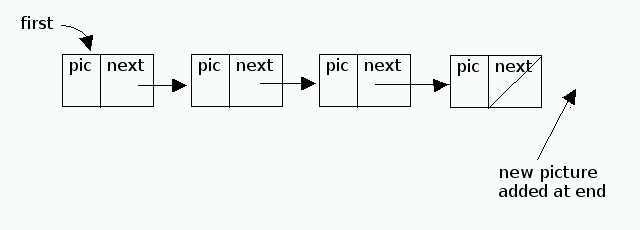
File scribbler-list-movie.c contains the basic elements of this linked-list-based movie program.
Work Started in Class
-
Copy scribbler-list-movie.c to your account, compile it, and run it. (Not much will happen, but you can check that the main program shell is syntactically correct.)
-
Write the details for addPicture (movieList * first, Picture frame)
Although writing this code requires some care, you already have seen most elements of this work:
-
Refer to the cons procedure in
program scheme-lists.c from the
previous Scheme-like Lists lab for
- how to use malloc to create a new node
-
how to reference a pic or data field
(no strcpy is needed to copy a reference to a Picture — why?) - how to reference the next field and how to set the field to NULL.
-
Addition of the new node to the movie involves two cases:
- If the first pointer is NULL, then the first pointer is changed to point to the new node .
-
Otherwise,
- Follow the approach of last procedure in the previous Scheme-like Lists lab to locate the last node on the list.
- Set the next field of the last node is set to the new node
-
Refer to the cons procedure in
program scheme-lists.c from the
previous Scheme-like Lists lab for
-
Write the details for void printForward (movieList first); which displays all pictures taken from the first to the most recent.
- Refer to the listPrint procedure in program scheme-lists.c from the previous Scheme-like Lists lab for an appropriate iterative algorithm (changing printing to the display of pictures).
-
Write the details for function void printReverse (movieList first); which displays all pictures taken from the most recent to the first.
Hints:
- Using your experience from Scheme and the recent Homework exercise in recent lab on Linked Lists in C, think recursively. The C code here can be similar, except that the list contains pictures rather than strings.
- Do NOT write loops for this procedure!
- What is a simple base case?
- How can a recursive case process something simple and call the procedure recursively to do the rest of the work?
Homework
-
Although the algorithm given in Step 2 works, it is inefficient. In particular, the entire list of pictures must be traversed every time a new picture is added. To avoid this repeated movement through the list, an additional variable can be added to point to the last item of the list. The revised algorithm to add a picture follows:
- Create a new node, initialize the pic to the new picture, and initialize the next field to NULL, as in part 2 of this lab (above).
-
Addition of the new node to the movie involves two cases:
- If the first pointer is NULL, then the first pointer is changed to point to the new node , and the pointer to the last node is changed to point to the new node.
-
Otherwise,
- Use the last pointer to identify the last node on the list.
- Set the next field of the last node is set to the new node
- Update the last pointer to designate the new node (now included at the end of the list).
Schematically, a movie is a sequence of nodes, as illustrated before, but now a last pointer is included as well as the first:
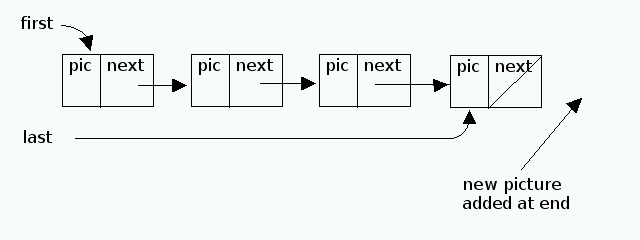
Feedback Welcome
Development of laboratory exercises is an iterative process. Prof. Walker welcomes your feedback! Feel free to talk to him during class or stop by his office.
This document is available on the World Wide Web as
http://www.walker.cs.grinnell.edu/courses/162.sp14/modules/module-lists/lab-lists-c-movie.shtml
|
created 21 August 2012 by Henry M. Walker revised 22 August 2012 by Henry M. Walker reformatted with modest editing 9 February 2014 by Henry M. Walker |


|
| For more information, please contact Henry M. Walker at walker@cs.grinnell.edu. |