| CSC 161 | Grinnell College | Spring, 2015 |
| Imperative Problem Solving and Data Structures | ||
Laboratory Exercise on Two-dimensional Arrays
Preparation before Class
- Reading from Text
- King, Section 8.2 OR
- K&R 5.7, 6.3 - 6.4
- Examples:
Introduction
The previous lab introduced a struct to combine several different pieces of data within one logical unit.
- Each piece of data has its own name.
- Different pieces of data may have the same or different data types.
In contrast, [one-dimensional] arrays provide a mechanism to access a sequence of data using a single index, such as item[0], item[1], item[2], ....
- One name, the array identifier (e.g., item) is used to designate the entire collection of data.
- An index, 0, 1, 2, ..., allows access to individual pieces of data.
- All pieces of data within an array must have the same type (e.g., int, double or a struct).
Some Basics of two-dimensional arrays
Expanding upon the concept of an array, C supports the organization of data in a table by specifying a row and a column:
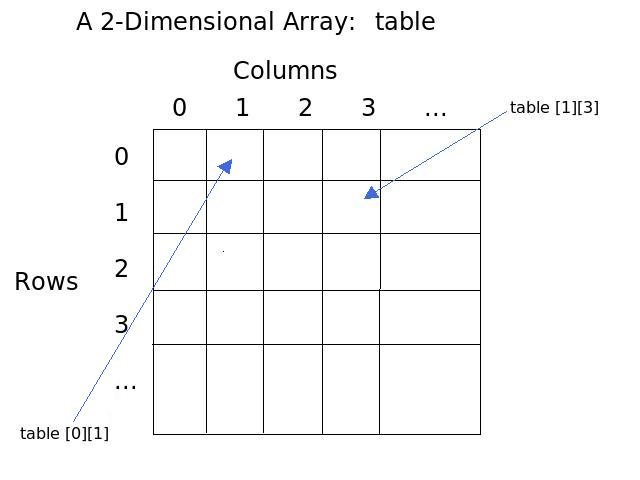
As with one-dimensional arrays, two-dimensional arrays can contain data of any type, although each entry in a table must have the same type. Also, the size of a two-dimensional array must be declared when it is first defined:
int table [5][10];
When using a two-dimensional array as a parameter, the declaration of a procedure header must know the number of columns in the table (so the computer knows when one row stops and the next starts). As with 1-dimensional arrays, a procedure header does not need to specify the number of rows in the table. Thus, if the above table were passed to a printArray procedure, the header of printArray might be given as follows:
void printArray (int arr[][10])
The examples and exercises in this lab illustrate working with 2D dimenstional arrays that conceptually store data of the same type within a table.
Example: Daily Precipitation for Six Cities
Consider a table that presents the amount of precipitation for six cities over an eight day period: December 18-25, 2014.
| Chicago | Denver | Des Moines | Phoenix | San Jose | Seattle | |
|---|---|---|---|---|---|---|
| Date | Illinois | Colorado | Iowa | Arizona | California | Washington |
| Dec. 18 | 0.00 | 0.00 | 0.00 | 0.00 | 0.00 | 0.51 |
| Dec. 19 | 0.00 | 0.00 | 0.00 | 0.00 | 0.19 | 0.12 |
| Dec. 20 | 0.00 | 0.00 | 0.00 | 0.00 | 0.06 | 0.77 |
| Dec. 21 | 0.00 | 0.00 | 0.00 | 0.00 | 0.00 | 0.00 |
| Dec. 22 | 0.28 | 0.14 | 0.34 | 0.00 | 0.00 | 0.00 |
| Dec. 23 | 0.13 | 0.00 | 0.34 | 0.00 | 0.02 | 0.81 |
| Dec. 24 | 0.12 | 0.00 | 0.09 | 0.00 | 0.04 | 0.21 |
| Dec. 25 | 0.00 | 0.21 | 0.00 | 0.00 | 0.00 | 0.00 |
| Totals | 0.53 | 0.35 | 0.77 | 0.00 | 0.31 | 2.42 |
This type of table arises frequently:
- Each row has a label (on the left)
- Each column has a label (at the top)
- Each cell (except the labels) has the same data type (e.g., doubles) and is stored in a in the two-dimensional array.
- Strings for row or column labels may be stored in separate one-dimensional arrays.
Program city-precipitation.c stores the precipitation data for this table in a two-dimensional array and prints the table.
Altogether, two dimensional arrays are a wonderful way to store lots of data which would otherwise require many arrays!
Work Started in Class
Working with Tables
-
City Precipitation: Copy city-precipitation.c to your account, compile it, and run it.
-
How is the precip array declared and initialized?
- What do the notations [8] and [6] represent?
- How are the initial values for each row specified?
-
Could the number of rows be omitted (e.g., precip [ ] [6])?
(An explanation is given later in this lab) -
Could the number of columns be omitted (e.g., precip [6] [ ])?
(An explanation is given later in this lab)
-
How are the rows and columns referenced and printed?
(Note that a nested loop is common in processing a 2D array or table.) - How is the array precip passed from the main procedure to computeCityPrecip?
-
How is the 2D array specified in the signature for computeCityPrecip?
-
Could the number of rows be omitted (e.g., rain [ ] [6])?
(An explanation is given later in this lab) -
Could the number of columns be omitted (e.g., rain [6] [ ])?
(An explanation is given later in this lab)
-
Could the number of rows be omitted (e.g., rain [ ] [6])?
- How does processing proceed in computeCityPrecip and why? Explain briefly.
-
How is the precip array declared and initialized?
-
Expand city-precipitation.c to add a function computeDayPrecip that computes and returns the total precipitation in a city for a given day, given the day number.
-
The function should have the following signature:
double computeDayPrecip (double rain [8][6], int dayNum);
- The function should not print anything — just compute and return the desired function. (Printing can be done in the main procedure, where formatting needs for the ouptut is known.)
- Use the function within the main program by adding a column to the table and also by adding a new section at the bottom of the output.
-
The function should have the following signature:
-
As a separate section in the main program, use function computeCityPrecip to determine the city with the city with the greatest amount of precipitation over the time range covered by the table.
-
Write a function total-precipitation that takes the precipitation array as a parameter and returns the total amount of precipitation from all of the citites over the full timespan covered by the table. Again, the procedure should compute and return the total, but printing should be done in the main program.
2D Array Storage
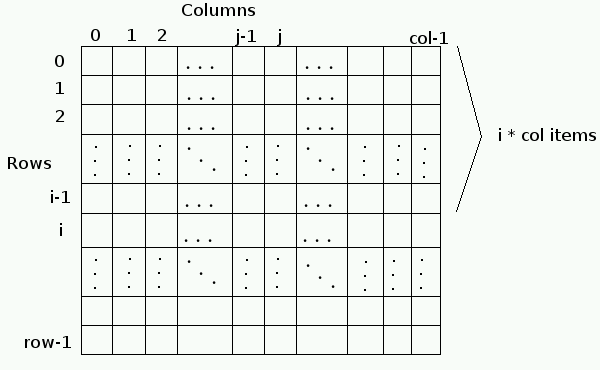
Now that we have some basic experience with two-dimensional arrays, we need to examine more closely how these arrays are stored in main memory. Suppose an array is declared:
table [row][col];
where row and col have been previously specified as integer values. A schematic of the array is shown to the right.
In main memory, the two-dimensional array table is stored row-by-row. First, row 0 is stored, then row 1, then row 2, etc. Such a storage configuration is called row-major order. Note that no extra memory is used to separate one row from another; the elements of one row immediately follow the elements of the previous row.
Initial Experiments with Table Storage
-
The layout of a table in memory impacts what data are accessed when a subscript is out of range, as illustrated in these experiments with the program city-precipitation.c from earlier in this lab.
- In city-precipitation.c, add a printf statement at the end of program to check that the table entry precip [5][6] gives the amount of rain for Seattle, WA on December 23.
- What values are printed when the entries precip [5][7] and precip [5][9]? Explain why these values are printed, based on the layout of memory.
- What values are printed for precip [6][0] and precip [6][-1]? Again, explain why these values are obtained.
-
Make a copy of city-precipitation.c, perhaps calling it city-precipitation-alt.c, and change the declaration of the precip array to allow space for another city.
-
The precip should be declared as
double precip [8][7] = { /* use same initializations as before */ ... - Do not change the initialization of the array, so values are given for 6 cities, even though space is allocated for 7 citites.
- Do not change the printing of tables, but do change the printing loop for the table, so the col variable covers the extra city column.
- What values are printed for the extra city? What can you hypothesize about how rows are initialized, if not all data are given to complete a row?
- Repeat Steps 5a, 5b, and 5c with this larger array. Explain what is printed?
- How would you adjust the column index in the print statements in Steps 5a, 5b, and 5c to obtain the same values printed before?
-
The precip should be declared as
More about 2D Storage
Look again at the storage configuration discussed above. The location of any array element can be computed very quickly. To locate element table[i][j], one proceeds as follows:
- Start at the base address given by the table variable.
- Skip over i rows; this involves i * col elements.
- Skip over j elements in the given row.
Altogether, the element table[i][j] may be found at address table + i*col + j. That is, the element itself may be referenced with the computation
element = *(table + i*col + j);
One consequence of this computation is that the compiler must know how many columns are in a two-dimensional array into order to determine where an array element might be. In particular, the signature of a procedure involving a two-dimensional array must include the number of columns. As with one-dimensional arrays, the number of rows need not be specified, as the computation of an element is valid for any i and j, as long as the number col is known.
In practice, column information may be included in a procedure header in either of two ways:
-
If col is an int variable declared globally in the program, then a procedure may have the header:
void proc (int table [] [col]); // col declared globally
-
Alternatively, col can be passed to the procedure as part of the parameters:
void proc (int col, int table [] [col]); // col passed as parameter
Declaration of 2-dimensional Arrays
The layout of a table in memory requires the computer to know the width of a table. Without knowing the width, the location of entry table [i][j] cannot be computed. This is illustrated further in the following exercises.
-
The following program will not compile. Copy the program 2D-array.c and look over the various array declarations.
The program is supposed to print out the sizes of each of the valid arrays and all of their rows one by one. Note that an integer is 4 bytes, and arrays in the program are arrays of integers. Thus, to find the size of an array the program multiplies how many integers are in the array by the size of an integer, which is 4 bytes. This is why you get 4 times the number of things there are in the array.
-
Which array declarations are invalid and are preventing the program from compiling? Do you see a pattern of when it is invalid? Comment out the lines that are not working.
-
Write in comments next to each array what the size of the whole array is and what the size of each row is?
-
How many elements does each array hold?
-
Write loops to display the contents of each array. You should use seperate nested for loops for each array.
-
Check whether you were correct on how many elements each array holds.
-
Add another array, array6[][], which has the numbers (0, 1, 2, 3) in the first row, (2, 4, 6, 8) in the second row, and (3, 6, 9, 12) in the third row. Display the array once you have declared and initialized it.
-
-
Returning to your copy of city-precipitation.c (perhaps called city-precipitation-alt.c, try making the following changes one by one. After making one change, go back to the original code before making the next change.
Parameter(s) for computeCityPrecip Call in main (double rain [ ][6], int cityNum) (precip, col) (double rain [8][ ], int cityNum) (precip, col) (double rain [ ][ ], int cityNum) (precip, col) (int numCities, double rain [ ][numCities ], int cityNum) (6, precip, col) (double rain [ ][numCities ], int numCities, int cityNum) (precip, 6, col) In each case, indicate why the code works, or why the compiler generates an error message.
Yet More Experimentation with Declarations
The following exercise is from Samuel Rebelsky's lab on multi-dimensional arrays: multi-dimensional arrays
-
Consider the following code:
int rabbit[2][3] = { 1, 2, 3, 4, 5, 6 }; int r, c; for (r = 0; r < 2; r++) for (c = 0; c < 3; c++) printf ("rabbit[%d,%d] = %d\n", r, c, rabbit[r][c]);-
What do you expect to happen when you try to compile this code inside of a main() method?
-
Check your answer experimentally.
-
What do you expect to happen when you try to run this code?
-
Check your answer experimentally.
-
-
Now replace your display loops with the following code:
for (c = 0; c < 3; c++) for (r = 0; r < 2; r++) printf ("rabbit[%d,%d] = %d\n", r, c, rabbit[r][c]);-
What do you expect to happen when you try to run this code?
-
Check your answer experimentally.
What is going on here is that two dimensional arrays are actually stored in memory as single dimensional arrays, laid out row after row. (As noted earlier, this is called row-major form.) There are some cool things which you can do with this, such as putting a Picture * into a two dimensional Pixel array with a function that treats the Pixel[][] array as a single dimensional Pixel array. You will see this shortly.
-
Homework
Example: Distances between Cities
Consider the following table that shows the distance, in miles, between eight cities in Iowa. (All distances are reported by the Iowa Department of Transportation at http://www.iowadot.gov/maps/distance.asp .)
| Cedar Rapids | Council Bluffs | Davenport | Des Moines | Grinnell | Iowa City | Mason City | Sioux City | |
|---|---|---|---|---|---|---|---|---|
| Cedar Rapids | — | 245 | 72 | 114 | 71 | 24 | 134 | 273 |
| Council Bluffs | 245 | — | 301 | 131 | 182 | 242 | 238 | 95 |
| Davenport | 72 | 301 | — | 171 | 118 | 56 | 206 | 341 |
| Des Moines | 114 | 131 | 171 | — | 51 | 114 | 120 | 194 |
| Grinnell | 71 | 182 | 118 | 51 | — | 63 | 127 | 232 |
| Iowa City | 24 | 242 | 56 | 114 | 63 | — | 153 | 291 |
| Mason City | 134 | 238 | 206 | 120 | 127 | 153 | — | 204 |
| Sioux City | 273 | 95 | 341 | 194 | 232 | 291 | 204 | — |
-
Write a program that
- stores the names of the cities in a char * array,
- stores the city distances in a 2-dimensional array,
- prints the table,
- computes the average distance from each city to all of the other cities,
- prints the city with the smallest average distance to the other cities,
- prints the city with the largest average distance to the other cities,
- computes the maximum distance in the table, and prints the two cities with that distance, and
- asks the user to enter two city names and prints the distance between those cities.
-
Step 11 asks you to store the cities in a char * array. Rewrite the program, so the cities are stored in a 2-dimensional array instead. That is, each row of the table will contain text for a city, and the letters will fill in the columns of each row.
Notes:
- Council Bluffs is the longest name. Counting the null character at the end of the string, this name requires space for at least 15 characters.
- Changing a city char * array to a two-dimensional array will require editing only about 6 characters. All of the rest of the program can remain unchanged!
Feedback Welcome
Development of laboratory exercises is an iterative process. Prof. Walker welcomes your feedback! Feel free to talk to him during class or stop by his office.
This document is available on the World Wide Web as
http://www.walker.cs.grinnell.edu/courses/161.sp15/modules/struct-2d-arrays/lab-2D-array.shtml
|
created 2 August 2011 by Erik Opavsky revised 8 August 2011 by Erik Opavsky modest editing 23 October 2011 by Dilan Ustek and Henry M. Walker modest reformatting 6 November 2011 by Henry M. Walker minor editing 25 October 2013 by Henry M. Walker reformatting, modest editing, discussion of 2D storage 1-2 February 2014 by Henry M. Walker readings added 19 September 2014 by Henry M. Walker lab reworked 28 December 2014 by Henry M. Walker |


|
| For more information, please contact Henry M. Walker at walker@cs.grinnell.edu. |

|
Copyright © 2011-2015
by Henry M. Walker.
|