| CSC 161 | Grinnell College | Spring, 2015 |
| Imperative Problem Solving and Data Structures | ||
Laboratory Exercise on Insertion Sort
Goals
The goal of this lab is to gain familiarity with the method of data sorting known as insertion sort, culminating in writing a simple insertion sort program.
Preparation before Class
- Reading: Insertion Sort
Work Started in Class
Reading Review
-
In today's reading, you learned about insertion sort. Write one to three sentences to answer each of the following questions.
- The reading claims that insertion sort is better for nearly-sorted lists than reverse-ordered lists. Why?
- How much extra memory is required for each sort?
- If the list is composed of four identical elements, how many elements change position when insertion sort is used? Why?
- Why might some people use insertion sort in real life?
Manual Use of Insertion Sort
-
For each of the following lists, draw the result of each insertion of the insertion sorting routine. You do not need to show the result of each comparison, just the final insertion of the element.
- [ 5 | 4 | 1 ]
- [ 3 | 1 | 3 ]
- [ 2 | 5 | 4 | 0 ]
- [ 6 | 8 | 3 | 5 | 1 | 9 | 2 | 2 ]
Identifying Elements of an Insertion Sort
-
In this exercise, you will examine two sorting programs to determine if
either is insertion sort. Download and save the
programs insertion-sort-proc1.c
and insertion-sort-proc2.c
in your directory for this lab.
- Compile and run both programs. Do both sort the given list appropriately?
- Look at insertion-sort-proc1.c. Is this an example of
insertion sort?
Hint: What exactly are the nested for loops doing? - Look at insertion-sort-proc2.c. Is this an example of
insertion sort?
Hint: What exactly is the while loop doing?
Error Checking in Insertion Sort
-
Download and save the
program insertion-sort-proc3.c
in your directory for this lab.
- Compile and run the program with the values 1, 7, 3, 5, 4, 2, 9, 8, 2, 6. Does the program produce the correct output
- Now run the program with a few of your own values. Does the program
still produce correct output?
Hint: try making some elements in the list negative. - Read through the program to locate the source of the error and fix
it.
Hint: the error is caused by one line in the program. - Write a paragraph explaining why this error caused the output you saw.
Pixels in a Picture as a 1D Array
-
Download the file 2D-1D-array.c and save it in your current directory.
- Read over the program and run it. Describe the output obtained.
-
The program prints the content of the 2D-array in two different way
illustrating how to convert from a 1D-array to a 2D-array.
- When processing data as a 2D-array, the values of i and j represent the indexes of the rows and columns of the 2D-array.
- When processing the data as a 1D array, we first create a new array that points to the beginning of the original array.
- The program illustrates at least two ways to specify the base address of a 2D array. Describe both, giving the code and an explanation of what the code means.
- How is the base address of the corresponding 2D array specified?
- How are array values organized from this base address?
- Explain how the similarities and differences between these 1D and 2D implementations could help manipulate Pixels.
Insertion Sort with Pictures
Although the description of the insertion sort in the reading considered the ordering of integers, the algorithm applies to any data which can be ordered.
-
Apply the insertion sort to the pixels in a picture.
- Download insertion-sort-picture.c and save it in your current directory. Read over the program and be sure you understand it.
-
Considering a 2D array of pixels as a 1D array, complete the insertion sort
function that sorts pixels in a picture.
- Insert the correct array parameter in main, so that the pixelInsertionSort procedure will be applied to the 2D array of pixels in the struct for pic.
- Copy the insertion sort in the reading for integers into PixelInsertionSort as a starting point.
- Much of the algorithm will run without change.
- Adjust the comparison of the size of array values in sorting, so that the sum of R, G, and B values are compared for two pixels.
- Adjust the type of material being sorted, so that pixels are manipulated rather than integers.
Be sure to compile and run the program to be sure it works.
-
Assuming the previous step was successful, you observed an original picture and a final picture after the pixels had been sorted.
- Add a call to rDisplayPicture within the main loop of the insertion sort, so that a picture is displayed every 50th iteration of the for loop. This should allow you to watch sorting progress periodically as the algorithm runs.
- Change the picture display, so that it updates more or less often than every 50 iterations. Do you find one frequency of updates more insightful or more fun to watch than another?
- Write 1-2 paragraphs to describe how the picture changes as sorting progresses.
Homework
Insertion Sort with Column-Major Order
In Module 010, you learned about arrays. In this module, you learned about multidimensional arrays. Below is an example of initializing a two-dimensional array:
In this example, the array of integers array has two rows, with the first row initialized with the values 4, 3, 8, 2, and 5, and the second row with the first two values initialized (2 and 1), and the remaining values are implicitly initialized to 0. So, a human-readable version of this two-dimensional array looks like the following:
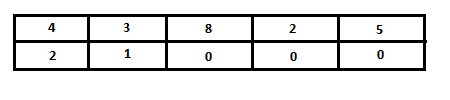
However, when you initialize the array in C, the program reserves a contiguous amount of memory for the array and assigns the values that have been specified. So, the above array is represented in memory as the following:

As you notice, the C program puts the array in memory a row at a time, beginning from the first row. This is called row-major order, and is the C standard. Some other programming languages, such as FORTRAN, use column-major order, in which each column is stored in memory contiguously. So, in column-major order, the array looks like the following:

When sorting a single-dimensional array in C, the most common method is to sort the elements from smallest to largest. Though sorting a multidimensional array is much less frequent, one method is to perform essentially the same method by sorting each row, so the rows are in order, but the columns are not.
-
Write a program that, using insertion sort, sorts a two-dimensional array in row-major order such that the elements in each row go from smaller to larger.
-
Write a program that takes a two-dimensional array and, using insertion sort, sorts it in column-major order, so the values in the top of each column are the smallest in the column, with the largest value in each column in the bottom.
Note that for this exercise, you should not perform a normal insertion sort (row-major order) and simply paste the result in the "column-major sorted" array.
Feedback Welcome
Development of laboratory exercises is an iterative process. Prof. Walker welcomes your feedback! Feel free to talk to him during class or stop by his office.
This document is available on the World Wide Web as
http://www.walker.cs.grinnell.edu/courses/161.fa14/modules/module-struct-2d-arrays/insertion-sort-lab.shtml
|
created 1 August 2011 by April O'Neill last revised 8 August 2011 by April O'Neill minor editing 7 November 2011 by Henry M. Walker reformatting lab, editing programs 2 February 2014 by Henry M. Walker readings added 19 September 2014 by Henry M. Walker discussion of 2D arrays rethought November/December 2014 by Anita DeWitt minor editing (mostly formatting) 25 December 2014 by Henry M. Walker new insertion-sort-picture.c January 2015 by Henry M. Walker |


|
| For more information, please contact Henry M. Walker at walker@cs.grinnell.edu. |

|
Copyright © 2011-2015
by Henry M. Walker.
|