Warning:
This course is under development.
Although the basic structure of this course is largely established,
nothing on this Web site should be considered official or even possibly
correct.
DO NOT MAKE PLANS BASED ON THE CONTENTS OF THIS SITE UNTIL JANUARY, 2020.
Simple Lists in Java
Introduction
The high-level concept of a linked list encompasses a flexible
structure for maintaining a sequence of data elements. Unlike
arrays, linked lists can be expanded or compacted as elements are
added or deleted, respectively. Further, elements on a list can be
reordered with little overhead. Altogether, linked lists provide a
powerful and convenient alternative to array storage for a range of
applications.
This reading introduces the concept of a linked list and then begins
a discussion of a pointer- or reference-based implementation of this
structure. The
next reading considers common,
additional operations for manipulating linked lists.
Acknowledgment
The opening parts of this reading are edited from "Computer Science
2: Principles of Software Engineering, Data Types, and Algorithms"
by Henry M. Walker, Scott, Foresman and Company, 1989, and is used
with permission of the copyright holder.
The Concept of a List
The concept of a linked-list structure may be motivated by
considering how we might maintain lists containing tasks we need to
do. Initially we might write down names of tasks as we think of
them. Then we might number these tasks in the order in which we
plan to do them. As we think of additional work to do, we might
write down each new task (perhaps the the bottom of the paper) and
then revise the numbering to indicate the order for doing the work.
Such a list is shown at the right.
The sample list at the right suggests several important
characteristics of lists. On a list, one task (Go Swimming) is
designated as the first item, and another (Do Homework) is the last.
The ordering of the list is specified by the numbering, not by the
physical location of the items. For example, Do Homework appears on
the first line in the example, but that task will be done last in
the work schedule. On the other hand, Go Swimming appears on the
second list of the list, but it will be done first.
A List of Tasks, as They might appear on Paper
-
Do Homework
-
Go Swimming
-
Mow Lawn
-
Buy Birthday Present
-
Clean Desk
Parenthesis Notation
Although numbered lists are convenient forms for specifying elements
and their ordering when writing on paper, these multi-line
statements can be somewhat awkward within a program. For this
reason, several programming languages use a type of parenthesized
notation for lists.
-
In the Scheme and LISP programming languages, lists are represented
by placing elements in round parentheses ( ) and
separated by spaces. For example, in both Scheme and LISP, the
above list of tasks (without numbers) might be represented as
( "Go Swimming" "Buy Birthday Present" "Clean Desk" "Mow Lawn" "Do Homework" )
[ "Go Swimming" , "Buy Birthday Present" , "Clean Desk" , "Mow Lawn" , "Do Homework" ]
Such languages vary regarding the types of data stored on a list.
In Scheme or LISP, a single list can hold data of multiple types:
( "string" 1 "another string" 3.7 5 )
In Scheme or LISP, parts of a list can even be another list. In the
following example, the main list has four components: a string, a
list of five integers, a real number, and an empty list.
( "string data" ( 3 1 4 1 5 ) 2.71828 ( ) )
In the ML programming language, elements of a list must have the
same type. For example, the following shows a list of integers,
whereas the above ML example illustrated a list of strings.
[ 12 , 345 , 6 , 78 , 90 ]
Since ML requires all elements in a list to have the same type, the
above Scheme/LISP example (with a mixture of a string, two lists,
and a real number) would not be allowed in ML.
Box-and-pointer Diagrams
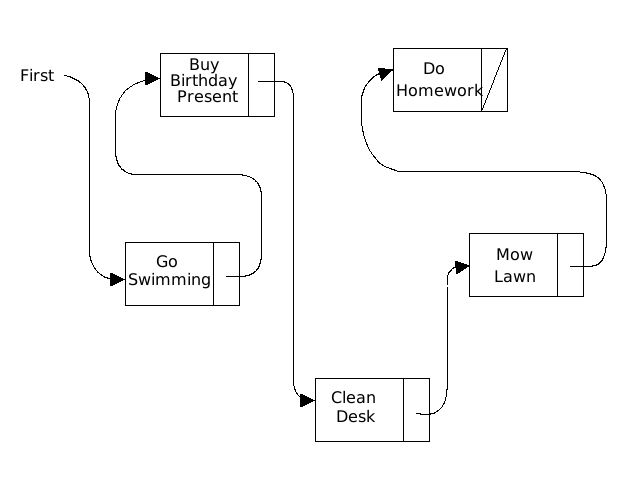
Several features of the original task list, given at the start of
this reading, are highlighted in the figure on the right, where the
list is shown in a different form — one that deemphasizes the
physical location of the items while stressing their order. With
this structure, each item on the list can be reached starting with
the first item and following the pointers or references from one
item to the next. This description of a list as a collection of
boxes and associated arrows is called a box-and-pointer
diagram.
In the figure with a List of Tasks using Pointers or References,
separate tasks are not written on different lines on paper; rather,
each list item is represented as a box with two parts:
-
the name of the task for the list entry,
-
a place to indicate which box is next (in the diagram, we
indicate this next box with an arrow).
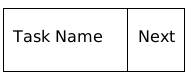
In this representation, the Task Name includes alphabetical
characters — data of type String. The arrows for
the Next part of the box, represent an address or reference.
As with the references we have encountered previously, arrows do not
contain the task names; instead arrows point to boxes, and the boxes
contain the task names.
Three additional characteristics of lists, as suggested by the figure,
also deserve mention.
-
A special reference is used to specify the location of the
initial item on the list. In the diagram, we used a
name First to indicate the start of the list.
-
A special symbol indicates the last element on the list, because
the last box does not have an arrow pointing onward. In the
diagram, we drew a diagonal line through the Next part of
the box for the last item, Do Homework. As we shall see, this
diagonal line will translate to a
null value in Java.
-
In the figure, a box contains both a task name and an arrow (or
pointer or reference) that specifies another box, As a structure
with two components, a box translates to a struct in C.
(More about this type of struct shortly.)
List of Tasks using Pointers or References
Why Box-and-pointer Diagrams?
Although box-and-pointer diagrams may seem somewhat removed from
writing programs, we shall see shortly that various manipulations of
boxes and pointers in these diagrams translate directly to
corresponding statements in Java!
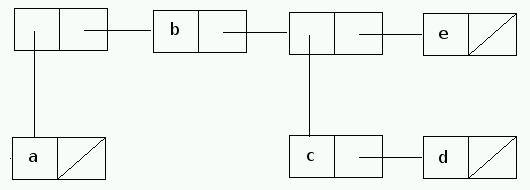
Example The List ((a) b (c d) e)
The list ((a) b (c d) e) has 4 elements
(i.e., the list (a), the item b, the list
(c d) and the item e). Thus, the starting point for
describing this list as a box-and-pointer diagram is to draw a list with
four boxes, as shown above.
-
The list (a) is a list with one item, so its box-and-pointer diagram
contains just one box with a as its data field.
-
The item b can be placed directly in the second box for
((a) b (c d) e).
-
The list (c d) is a list with two items, so its box-and-pointer
diagram must contain two boxes — for c and d.
-
As with the item b, the item e can be placed directly
in the fourth box for ((a) b (c d) e).
The resulting box-and-pointer diagram for ((a) b (c d) e) follows:
Example: A List with One Element — a null List
A list with no elements is the null list, represented in parenthesis notation
as ( ). To clarify this concept, consider the list
( ( ) ).
-
( ( ) ) is a list with one element — the
null list, so ( ( ) ) must be represented by
a box-and-diagram diagram with one box.
-
The data field in the one box consists of a list ( ) with
no elements, A list with no elements must have no boxes, so it must
be represented by a null pointer or reference.
Putting these pieces together, the box-and-pointer diagram for
( ( ) ) is:
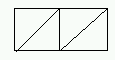
Here, the main list has one item, represented by a single box (with
a line through the next field. Also, the data field represents a
null list (a null reference to an empty list of no boxes), so the
data field also has a line through it.
Head/car/hd/getData, Tail/cdr/tl/getNext, cons
Since lists are naturally represented by boxes with pointers or
references, much list processing can be translated to operations to
construct the box or to access fields of a box. Consider a simple
box
As we shall shortly, much list processing (i.e., work with
box-and-pointer diagrams) normally reduces to three basic
operations.
-
A constructor function constructs a box, given a data value and an
existing list. (Note: In much literature and some
languages, this contructor function for a box structure is
called cons.)
-
Given a box, the head function returns the data field or
string.
-
The tail function returns an arrow to the next box.
Head and Tail in Several Languages
Although the function names, head
and tail, are descriptive, these functions have
different names in several programming. Further, in Java, retrieval
of the parts of a box depend on getter functions, and the method
names will correspond to the field names. The following table
identifies the head and tail operations in
several languages.
| Descriptive Name
| Function in Java
| Function in Scheme or LISP
| Function in ML
|
| head
| getter for Task Name field
| car
| hd
|
| tail
| getter for Next field
| cdr
| tl
|
Historically, the names for "head" and "tail" in Scheme and LISP
come from details of the original hardware on which these languages
were developed. Back in the late 1950s, LISP was implemented on an
IBM 704 computer, and that hardware had specific storage locations,
called registers, for use during processing. These
registers, in turn, were divided into pieces, including an "address"
section and a "decrement" section. When utilized for list
processing within LISP, the "address" section was used to store
information relevant to a data field, and the "decrement" section of
a register was used to store information relevant to a next field.
In this context:
-
car is an acronym for Contents of the Address
section of a Register, and
-
cdr is an acronym for Contents of the Decrement
section of a Register.
List Construction
When constructing a list, a primary step involves three basic steps:
-
building a box,
-
placing data in the data field, and
-
recording in the next field what box comes after the current box
in the list.
For example, the list (a) is constructed by
constructing a box, placing a in the data field, and
setting the next field to null. This work is accomplished by the
operation (cons a ()), which yields the following
diagram.
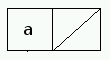
Here, the placement of a in the data field indicates
that this is the head of the list. The diagonal line through the
right half of the rectangle indicates that nothing comes later in
this list. In summary,
cons (a ()) gives the list (a).
Next, consider the list cons (b (a)) or (b
a). Here, we draw another rectangle, where the head
specifies b and the tail points to the representation
of (a) that we already have seen. The result is:
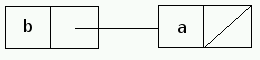
Similarly, the list (d c b a) is constructed as
(cons (d cons (c cons (b (cons (a ()))))
and would be drawn as follows:

In general, an entire list is obtained through a sequence
of cons operations, in which each box is drawn, data
are placed in the data or name field, and a pointer to the next box
is placed in the next field.
When creating nodes in Java, the creation of a box and filling the
data and next fields often is done with a single node constructor.
For illustration, we suppose a box contains fields data
and next, and suppose the node class has a
two-parameter constructor for these fields. Then a new box could be
created with a call similar to
New ListNode (needed-data , needed next reference)
List Traversals
Given a list, the head operation allows a program to
access data in a box, and the tail operations the
program to locate the next box in the list.
Example: Moving within List (dbca)
To illustrate, suppose the variable
listDCBA represents the list (d c b a)
above.
Within this context,
-
head(listDCBA) returns the data
element d — the data in the first box within
the list.
-
tail(listDCBA) designates the list coming after the
first box — the list (c b a)
-
head(tail(listDCBA)) returns the data element in the
list starting after the first box (— the data element of the
list
(c b a).
-
tail(tail(listDCBA)) returns the list coming after the
(c b a) list — that is, the list
(b
  a)
.
Example: Printing a List
As a second example, consider the problem of printing the elements on
a list — perhaps printing a list using parenthesis notation.
To print all items on a list, we need a separate
variable listPtr that starts at the first box and moves
progressively from box to box. Since we want listDCBA
to maintain its record of where the list starts,
the listDCBA variable should not be changed while
printing, so we use the separate variable listPtr to
keep track of where we are when printing.
With this general background, the task of printing elements on a list
is reasonably short. The following pseudocode ignores details of how to
print, but otherwise provides a good outline of how to print the
elements of a list.
listPtr = listDCBA
while (listPtr != null)
{
-
listPtr starts at the first box on the list
-
listPtr will go from one box to the next. Processing
should continue until there are no more boxes, so the printing
process should continue until listPtr is null.
System.out.print (listPtr.getData() + " ");
-
Using Java notation, the data field at the head of a list is
given by the getData function.
-
Since details of printing depend upon the type of data, formatting within
a print operation will vary according to whether the data is
an integer, real number, string, or other type.
-
After printing data for one box, a space is needed to separate the
output from one box from that of the next box.
   listPtr = listPtr.getNext();
}
System.out.print\n (")");
Representing a Box-and-Pointer in Java
In computer science, box-and-pointer representation is a primary
mechanism used to describe lists. An implementation of lists in C
typically utilizes this graphical perspective and involves three main
elements:
-
a
struct listNode which implements a box-and-pointer unit,
-
a
first pointer that indicates the location of the first node in
a list, and
-
a collection of operations which aid in the processing of the
box-and-pointer nodes.
A typical listNode contains two elements — one for
data and the other to identify the next node on a list. Since Java
requires that we declare the type of data fields, we must tailor the data to
the application at hand. For the remainder of this reading, we assume the data
will be a string. The following declarations capture these elements as the first part of a ListNode class.
public class ListNode {

    protected int data;      // the information to be stored in the node
    protected ListNode next;    // the pointer to the next ListNode

    // Constructors
    public ListNode (int startingData) {
        data = startingData;
        next = null;
    }

    public ListNode (int startingData, ListNode nextNode) {
        data = startingData;
        next = nextNode;
    }

    //getters and setters follow
To clarify these lines, a ListNode is a structure
with data and a next field, together with
constructors and getters and setters.
In designing the data field of a list node, note that the data
field actually records a reference to the string. The string
itself can be of any length, and the data field just records where
that string is stored.
The full ListNode, with getters and setters, is
available here.
Some Designs for Simple List
While ListNode provides appropriate support to build
lists that implement box-and-pointer representations, the design of
a list may combine these listNodes in one of several
ways. Here are some basic issues:
-
List functions, such
as cons, head, tail, take
lists as parameters and return new lists or data. When
implementing these functions in Java, two main choices are
possible:
-
should functions, such as
cons
and tail, reference an existing list, or
-
should operations return new and updated lists?
-
When modifying a list, perhaps with cons
or tail, should there be a connection between the
old list and the new one; that is,
-
should an operation give rise to a completely new structure, or
-
should an operation reuse nodes from an earlier structure
when possible?
To clarify this second point, suppose x represents the
list (b c), and suppose y is defined as
(cons 'a x)).
In summary, we can consider y to be the list (a b
c). The following figure shows two possible structures that
could result:
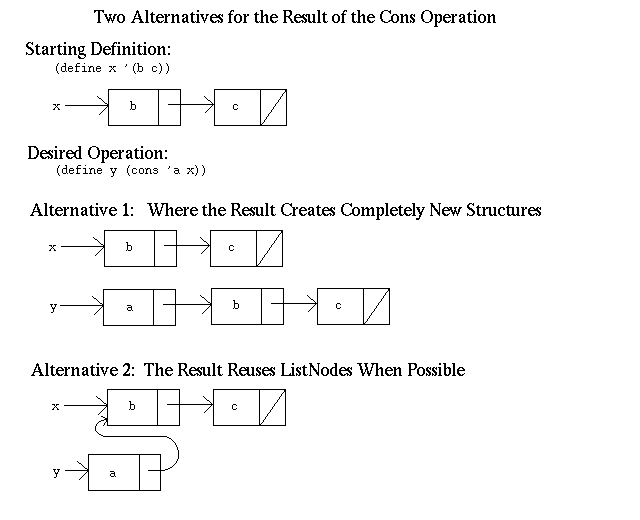
In the first option, the nodes of the original list are copied, and
thus are explicitly distinct from those in the new list. In the
second option, a new node is created for the cons node,
a new value is added within that node, but the next
part of that list refers to the old list.
For the example shown, both options may be reasonable. However,
suppose we now change the second element of x from c
to d. (That is, the new x is the list (b
d).) In the first option, y is not affected, while in the new
approach y becomes the list (a b d). Since
y refers to x when nodes are reused, any change to
x also affects y. This may or may not be the
desired result of changing x.
Overall both approaches have some advantages in certain cases.
However, the first approach requires considerable overhead to
duplicate nodes. Furthermore, in a purely functional context, lists
are not altered during processing. In such a context, we could
reuse nodes without fear of altering other lists unexpectedly, as
old lists are never changed. Both of these observations explain why
Scheme and LISP uses the second approach — reusing nodes when
possible. Other languages might take another approach.
Throughout the rest of this course, we use Alternative 2, reusing ListNodes
when possible to make new or modified nodes.
Implementing Simple List Operations in Java
Before considering specific details of the Java methods, we review some
elements of Java syntax, based on the box-and-pointer representation for the
list (a b c).
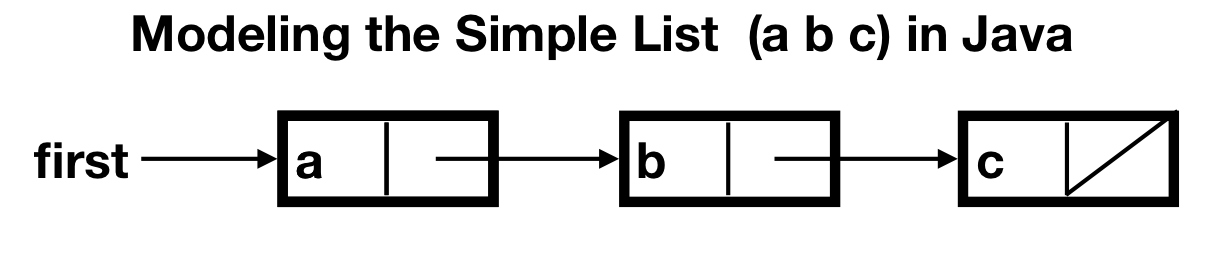
In this diagram, first is a variable that references a
ListNode:
ListNode first;
Once declared, first is a reference to a
ListNode,
Within this ListNode, first.data yields the
data field within the ListNode,
and first.next yields the next field.
With this notation, we now review a
SimpleList.java class that
utilizes the ListNode class with its data
and next fields.
listPrint
Given a constructed list, we can print the list data by atarting at
the first node and proceeding node-by-node. For this, we need a
temporary variable listPtr that starts at the beginning
of a list and then progresses node-by-node until the end. By
convention in Java, a pointer or reference that does not specify any
node is called null. Also, given one position in the
list, the next node is obtained by looking in the next
field. Putting these details together, the main structure of a
printing loop is:
ListType listPtr = list;

while (listPtr != null)
  {
      /* printing details go here */
      listPtr = listPtr.getNext();
}
If we are to print results in parenthsis notation, we should enclose
an entire list in parentheses and separate successive list elements by a
space. These details require a little care.
Inialization
Before processing begins, a list has no nodes, so it would be assigned
the value null:
first = null;
Full Program
These definitions and methods combine to give program SimpleList.java.
created 4 May 2000 by Henry Walker
revised 4 August 2011 by David Cowden and Dilan Ustek
minor revision 21 November 2011 by Erik Opavsky
expanded and reformatted 18-25 November 2016 by Henry M. Walker
translated from C to Java 24-25 January 2020 by Henry M. Walker
|


|
|
For more information, please contact
at
.
|

